
When your members pay online for a subscription or something from your shop, that money goes into your own Stripe account. Stripe is our payment provider. You set everything up under Money → Payouts. Only the owner of the business can do this, because you sign on behalf of the company.
A separate Stripe account. You create a new account here, linked to your business in xBase360. Even if you already have a Stripe account: you can’t link that existing account. So there’s no need to create a Stripe account on Stripe’s website beforehand.
What to have ready
- Your company’s name, address and phone number, as registered with the KvK (Dutch Chamber of Commerce).
- Your KvK number, and your VAT number (or confirmation that you use the small business scheme).
- A valid identity document for the owner. Which documents Stripe accepts in the Netherlands is in this list from Stripe.
- The bank account number you want to receive the money in.
- Your business’s web address, for example your website or your social media page. Stripe may ask whether it’s really yours; see Verifying ownership of your website.
Allow about ten minutes. You can read why Stripe asks for all this in Know your customer obligations: by law, a payment provider must know who it’s doing business with.
The route, step by step
 (opens at full size in a new tab)
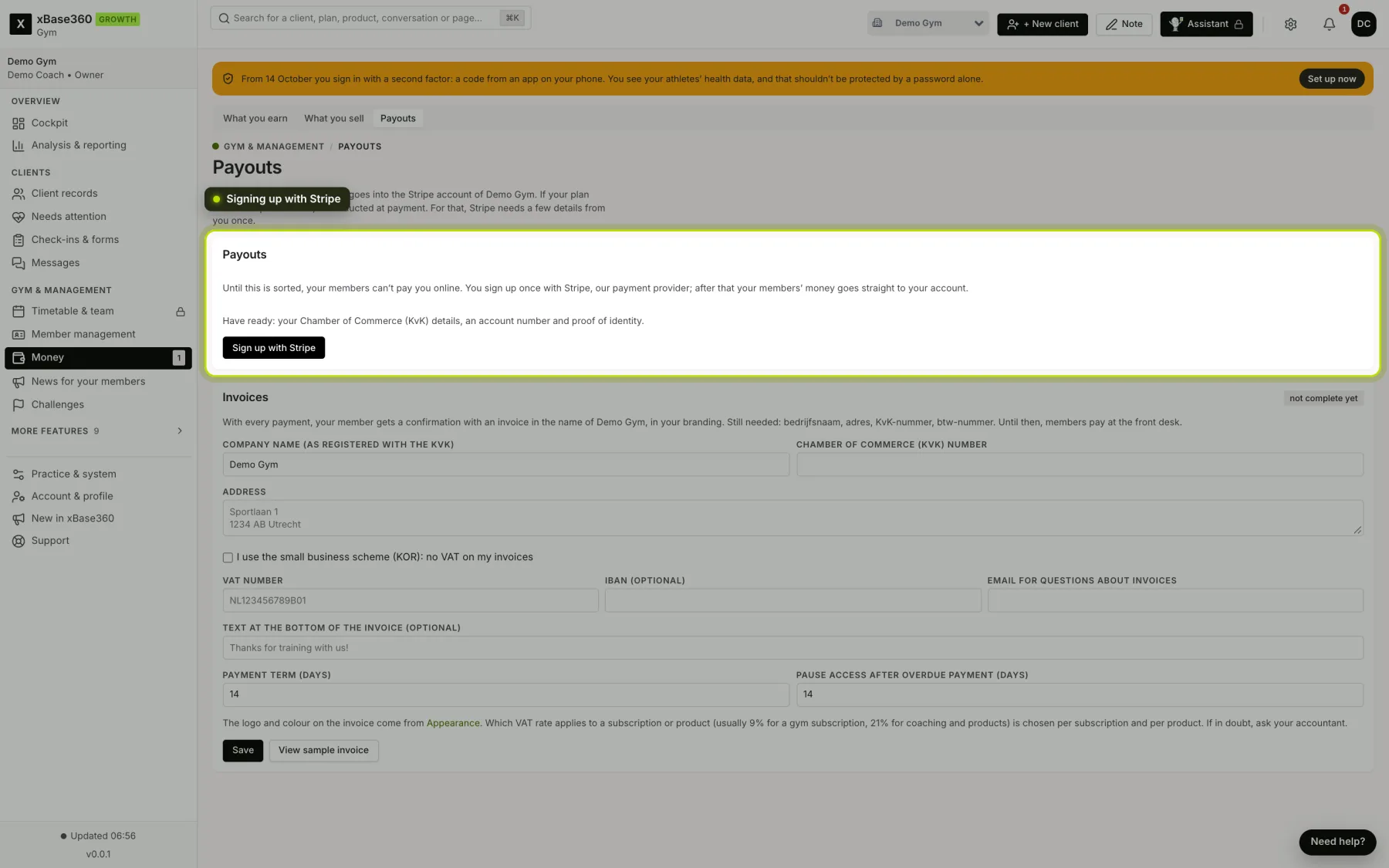
- Your business details for invoices. Under Money → Payouts, in Invoices, fill in the company name (as registered with the KvK), the KvK number, the address and your VAT number. If you use the small business scheme (KOR), tick that; you then don’t need a VAT number. Every payment gets an invoice in your name, and that’s not possible without these details.
- Signing up with Stripe. Click Sign up with Stripe. You land on a form from Stripe itself and fill in your details there. Afterwards you return to xBase360 automatically. Interrupted? Then it says Finish sign-up, and you continue where you left off.
- Stripe checks your details. Usually within minutes, sometimes a day. The tile shows how far along it is. If Stripe still needs something, it says exactly what below: for example An identity document for the owner.
- Done. When it says Done. Your members can pay you., your members can pay online from then on. Until that moment, and as long as your business details for invoices aren’t complete, they can only pay at the front desk.
Prices and products: you don’t create anything in Stripe
You manage everything you sell in xBase360. Stripe receives it automatically.
- Subscriptions. You create them under Subscriptions; see Creating subscriptions for your members. When a member takes out a subscription for the first time, we put the subscription and the price in your Stripe account, with the billing period (weekly, monthly or yearly). A joining fee appears as a separate line on the first payment.
- Changing a price. Simply change the price in xBase360. For new members a new price is created in Stripe, and the old one is switched off. Members who already have a subscription keep their old price. A price increase for existing members is a decision you make deliberately, not something that slips through with a form by accident.
- Your shop. Products are under Shop; see Setting up your shop. You don’t add them as products in Stripe. With every order we pass the name and the amount at that moment to Stripe.
- VAT. Your prices include VAT, as on your price list. The invoice calculates the VAT.
When the money is in your account
Stripe transfers it every Monday, for payments that are at least fourteen days old. That way there’s a balance available if you refund something. You can see what has been paid out and when in your Stripe dashboard: click Go to my Stripe dashboard in the tile. See also What is a payout? and My payout is missing or postponed.
Our share: the platform fee. On every online payment from your members, Stripe deducts a platform fee for us: 1.7% + €0.30 per payment, including VAT. If a member pays their subscription by credit card, it’s 3.0% + €0.30 from the second instalment, because cards cost more at Stripe. In return you don’t pay any Stripe fees: we cover those, as well as the Stripe Connect fees. For a subscription, Stripe converts the fixed part into a percentage of the instalment price; at €35 a month that’s 2.55%, or €0.89. Subscriptions that were already running before the fee applied keep their original terms. Under Money → Payouts you can see the current rate, a worked example and what went to you net over the last thirty days.
Your member’s bank statement shows your name, not ours. An unfamiliar name on a statement is the most common reason someone reverses a payment.
Changing something later
- Different bank account number: in your Stripe dashboard; see Updating your bank account for payouts.
- Different personal details: see How can I update my personal information?.
- Can’t sign in to Stripe: see How do I sign in to my Stripe Express account?. The quickest way is still the button in the tile.
- Filled something in wrongly during sign-up? Some choices, such as the type of business, can’t be changed at Stripe afterwards. In that case choose Erase and start over: everything you filled in at Stripe is erased and you start with an empty form. That’s only possible as long as you can’t receive payments yet.
More questions about your Stripe account? The Stripe help centre for Express accounts is available in English. For xBase360 itself, we’ll help you through the support chat.
Without Stripe your members can only choose pay at the front desk in the app.