
Under Meal plans → New meal plan you create a series of days that repeats. Three days is a common start: after day three comes day one again. One day is fine too; it then repeats every day.
Start empty or with AI. Fill in the days yourself, or enter the goal, kilocalories and protein and get a draft with products from your list. Nothing is saved until you press save.
In the coach app, from your client. With a client, under Assign meal plan, is the Create meal plan with AI button. Your client’s nutrition goal is already filled in; if your client has a training day and a rest day, each gets its own goal and the AI makes days of both kinds. Then choose how many different days, which meals and how many snacks, the eating style (for example vegetarian or gluten-free), what mustn’t be included and what definitely must, how quick it should be to prepare, whether a protein shake is allowed and whether your business’s recipes can be used (the AI then prefers a recipe for hot meals, with the number of servings). Allergies your client entered themselves in the health overview aren’t visible to you: ask about them. The outline shows the totals per day against the goal. Save it, refine it in the builder and assign it. Your choices are remembered for your next client; what belongs to one client isn’t.
 (opens at full size in a new tab)
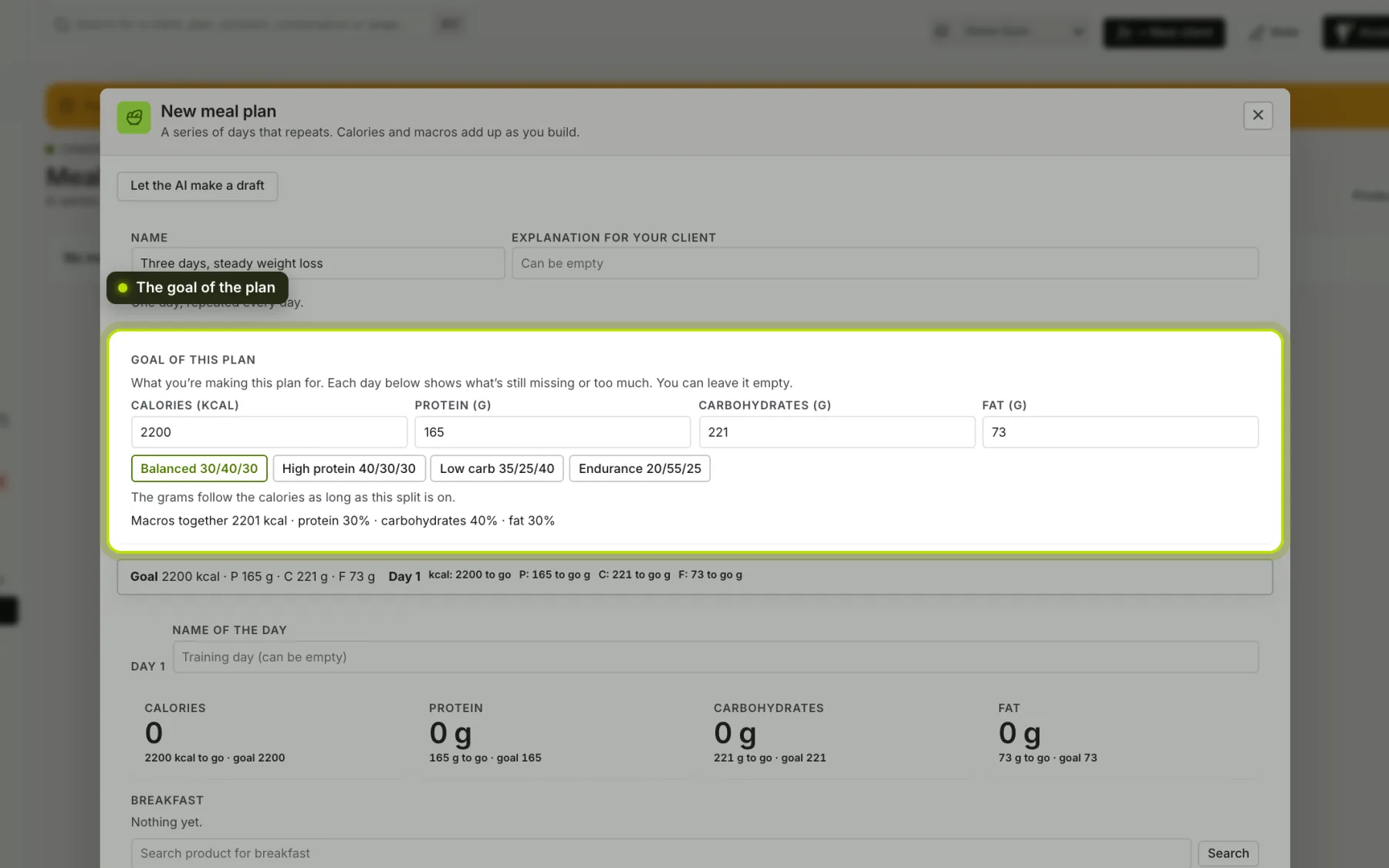
The plan’s goal. At the top you set what you’re making the plan for: calories, protein, carbohydrates and fat. Choose a split (for example Balanced 30/40/30) and the grams are calculated from the calories; if you change the calories, they follow. Below each number for a day it shows what’s still missing (40 g to go) or too much (12 g over), and a bar at the top stays in place while you scroll through the days. You can leave it empty.
Per meal. For each meal, add a product or a recipe, with the amount: grams for a product, servings for a recipe. Calories and macros add up as you build.
Pieces and spoons. Next to the amount you choose the unit: grams, or a measure of the product, such as medium (M) for an egg or slice for bread. Choose 2 × medium (M) and the plan calculates with 110 grams. For liquid products, tablespoon (15 ml) and teaspoon (5 ml) are always available. If the measure you mean isn’t there, choose Custom measure…: for example Tablespoon = 6 g for oats. That measure is then ready for that product.
Finding products. Above the results you choose where to search: All products, Favourites (star a product; the same stars as in the app), Frequently used (what appears most often in your plans) or Own products (what you or your business added). A list immediately shows what’s in it; if you type a word, you search within it.
A product that isn’t there. Add it yourself, with the values per 100 grams and optionally a brand. It’s added to your business’s products.
A training day. Give a day a name, such as training day, so your client knows which day to pick.
Explanation. Write down why you set it up this way. Your client reads it in the app.
Editing. What you save applies straight away to everyone following this plan.
Archiving. Archive a plan you no longer use. It disappears from your list; what’s been assigned to clients carries on. You can bring it back later.
See also Assigning a meal plan and House rules for the AI.